If you are anything like me, you have probably spent more time tweaking your Call of Duty Mobile settings than actually shooting enemies. I’ve been playing COD Mobile since the day it dropped, and even though it’s 2026 now, the core control philosophy hasn’t changed – it just got richer. New maps, new weapons, new battle passes, yet the foundation of a good game still sits inside that settings menu. Whenever a friend asks me why I seem to snap onto targets like they’re magnetized, I tell them it’s not the device; it’s the layout and sensitivity I’ve painstakingly dialed in. So let me walk you through the exact setup I use right now, and explain why a handful of arcane slider positions can make you feel like you’re wearing a perfectly tailored glove instead of oversized oven mitts.
The soul of control: Advanced Mode and fire selector logic
First, head into the control settings – this is the raw clay of your gameplay. The game will offer you a simple mode, but please, flick that toggle to Advanced Mode. This is the single most important decision you will make. Advanced Mode gives you manual command over when your weapon discharges its fury. Think of the default auto-shoot as having a nervous pianist who hammers the keys the moment he sees sheet music; Advanced Mode makes you the pianist. You decide exactly when that first bullet cracks the air. This is vital when you want to slink behind a squad, melee someone silently, or simply not waste a magazine because a pixel twitched across your crosshair.
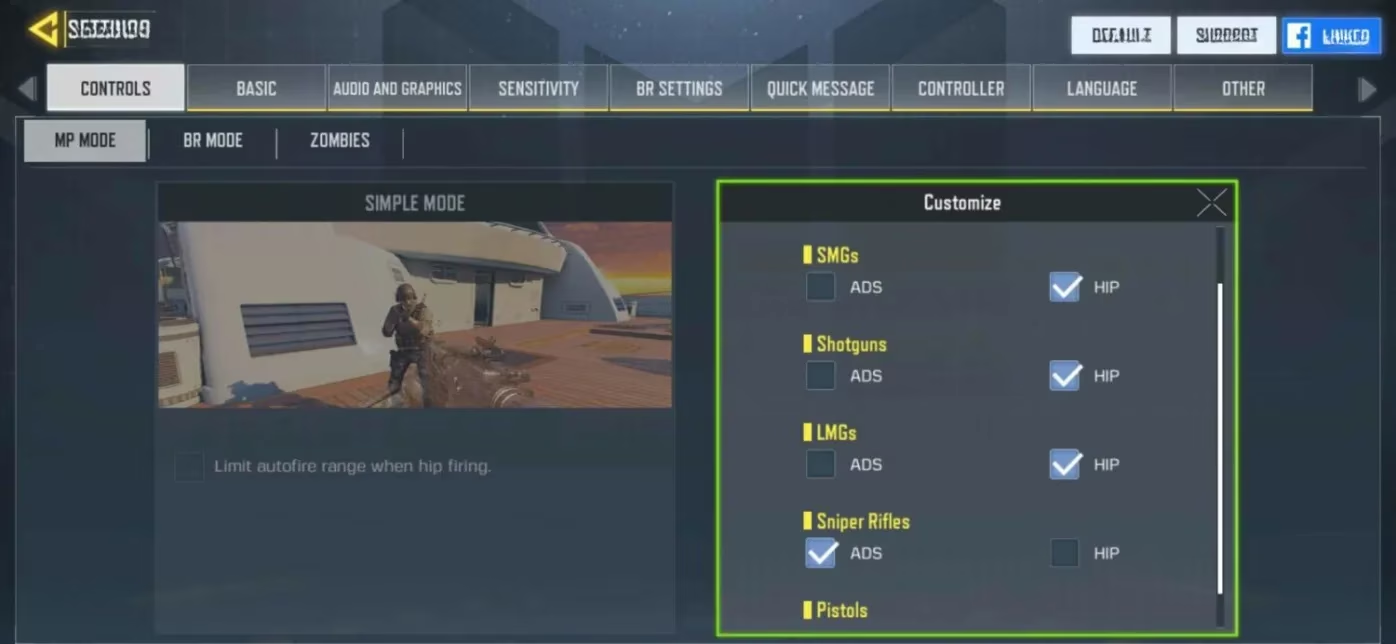
With Advanced Mode activated, the next subtle masterpiece is the fire selector. Most players leave everything on ADS, but that’s like pouring honey over your trigger finger in close quarters. I set all primary weapons to Hip Fire except sniper rifles, which remain on ADS. Here’s why: when an enemy suddenly fills your screen at three meters, hip fire keeps your view wide and your movement fluid. You save the precious split second that would have been lost to a scope animation. For snipers, though, ADS is my loyal companion – it lets me quickscope without fumbling. A second press of the aim button keeps me scoped in for follow-up shots. It’s a paradox you will learn to love.
Sensitivity: the magnifying glass on your thumbs
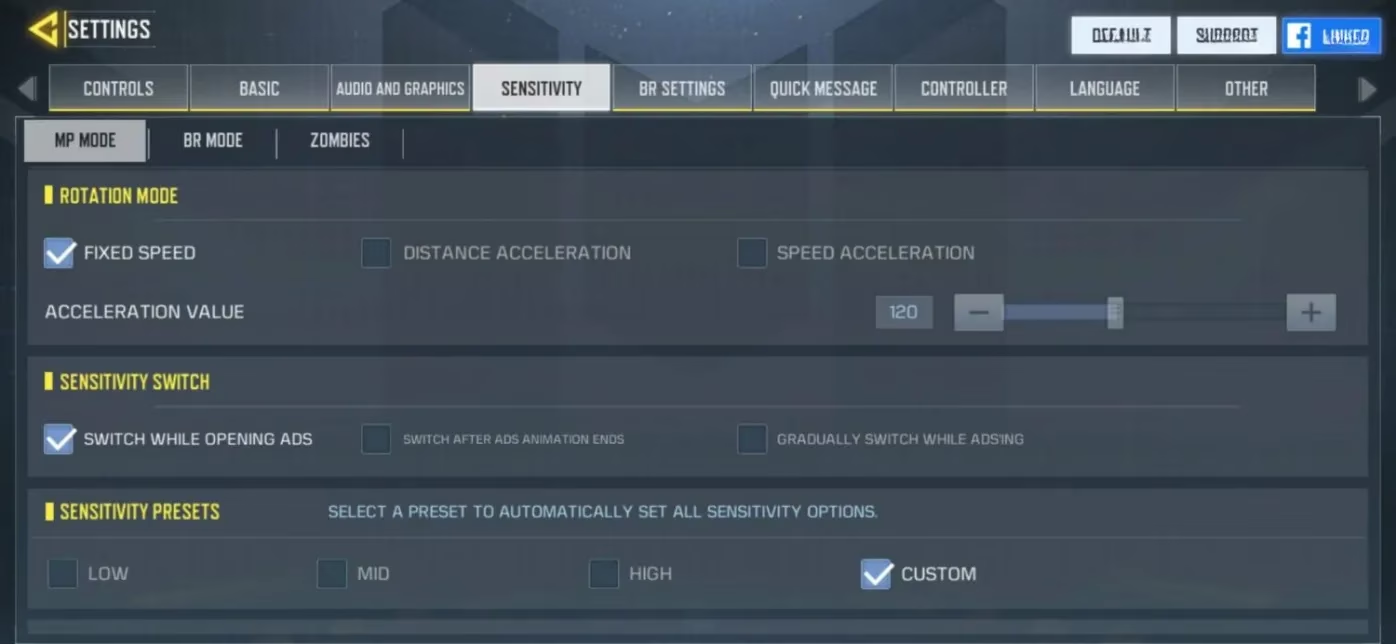
Sensitivity settings are where muscle memory is forged. I’ve seen players copy pro streams and then wonder why their camera spins like a headless chicken. The first step is setting Rotation Speed to Fixed. Without this, acceleration curves muddy the water. Fixed speed is like having a ruler taped to your screen – you know exactly how far to slide your thumb to do a 180-degree check. A good test: place your thumb in the center of the screen and swipe to the very edge. Your character should turn directly backward, not overshoot into a corkscrew. If it doesn’t, adjust the standard sensitivity until it feels like a compass needle snapping true north.
Now, let me share my personal multiplayer sensitivity numbers, which I’ve kept stable since 2024 because they feel like a balanced gyroscope:
-
Camera Standard sensitivity: 60
-
ADS sensitivity: 88
-
Tactic scope sensitivity: 129
-
Sniper scope sensitivity: 80
-
Firing Standard sensitivity: 70
-
Firing ADS sensitivity: 88
-
Firing Tactic scope sensitivity: 120
-
Firing Sniper scope sensitivity: 80
Don’t copy these blindly; treat them as the ingredients for your own soup. The firing sensitivities are slightly more responsive because I want my recoil control to feel like a steady heartbeat – present but never erratic.
For Battle Royale, where engagements happen across valleys and rooftops, I use an equally deliberate layout:
| View type | Camera sensitivity | Firing sensitivity |
|---|---|---|
| Third-person | 80 | 80 |
| FPP view turning | 65 | 65 |
| Optics | 90 | 90 |
| Tactic scope | 80 | 80 |
| 3x tactical scope | 60 | 60 |
| 4x tactical scope | 50 | 50 |
| Sniper scope | 45 | 45 |
Remember, these numbers are not sacred tablets; they’re your trailhead. If you find yourself losing long-range duels, nudge those scope sensitivities down by five points at a time until controlling recoil feels like polishing glass – smooth and squeaky-clean.
The conductor’s hands: two-thumb layout
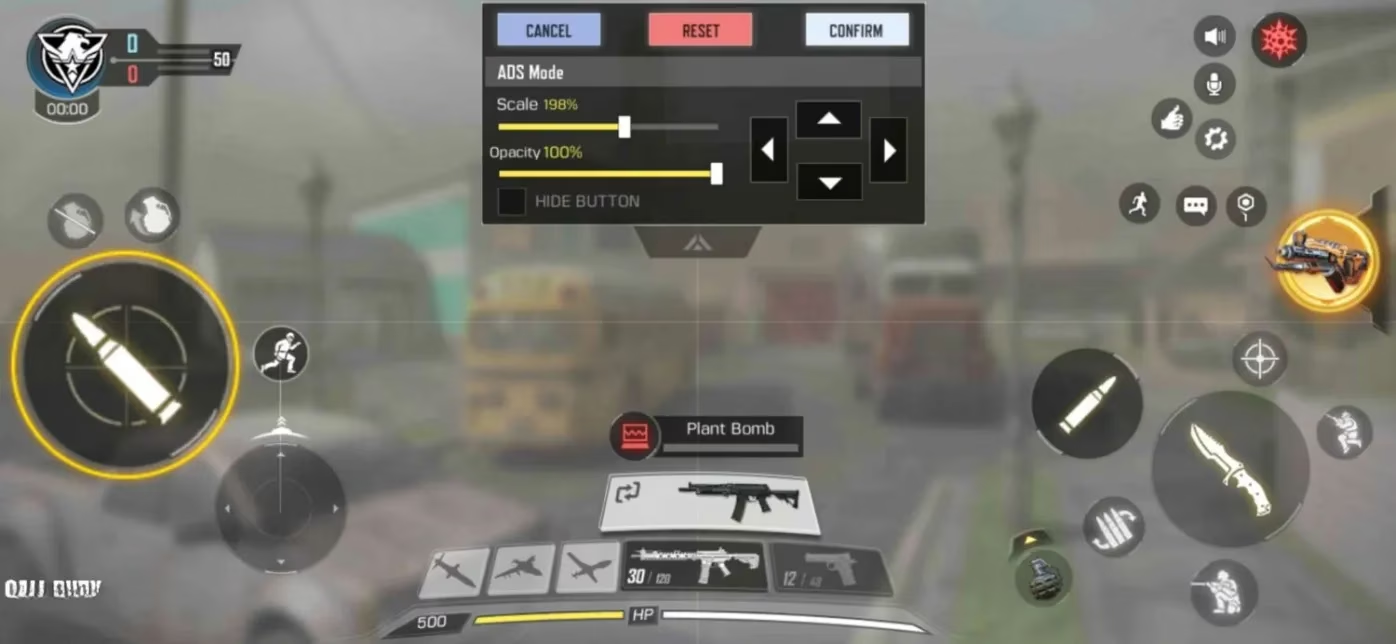
Mobile screens are miniature arenas, and your fingers are the gladiators. I have experimented with claw grips, triggers, and tablet stands, but I always return to the two-thumb layout because it keeps my hands relaxed and my reaction time sharp. Trying to play claw on a phone can make your hands feel like a crab wearing boxing gloves – technically armed, but awfully clumsy. Instead, a well-organized two-thumb arrangement gives each digit a clean jurisdiction.
For multiplayer, I place the fire button large and toward the upper right, with jump and slide buttons immediately accessible to the same thumb. Movement joystick stays bottom left. For Battle Royale, the layout blossoms slightly: vehicle controls become essential, and I swear by Vehicle Layout C. It separates accelerate and brake into intuitive zones so you don’t accidentally honk when you mean to drift. That layout turns a buggy into a ballet dancer.
One metaphor I keep close to my chest: your sensitivity and layout together are like the string tension on a violin. Too loose and you get no tone; too tight and the string snaps. When you find the right combination, every flick of your thumb sings. That is the moment you stop fighting the game and start playing it.
Keeping it fresh in 2026
By now, COD Mobile has seen dozens of updates – new scorestreaks, the arrival of extra tactical equipment, and even some reworked vehicle physics in Battle Royale. Yet the classic Advanced Mode, the hip-fire/ADS split, and customized sensitivity remain the lighthouse in a stormy patch notes. I still revisit my settings after a major update because sometimes sliders get reset or new scopes with different zoom levels demand a fresh testing session.
Don’t be afraid to spend 15 minutes in the training room just swiping and shooting at walls. That ritual is the equivalent of a chef sharpening their knives before a dinner rush. And when you finally nail a cross-map snipe or wipe a squad because you could hip-fire into a slide, you’ll feel the invisible machinery of your settings doing its silent, flawless work. The best settings aren’t the ones you see on a leaderboard; they are the ones that fade into your instincts. See you on the battlefield, properly configured.